Updated as of July 2026. Comparison based on public documentation of both platforms. Let us know about any inaccuracies: we'll fix them.
If your company uses Microsoft 365, the question is inevitable: why not build AI agents with Copilot Studio, since it's already there? It's a fair question, and it deserves an honest answer: for some use cases Copilot Studio is the natural choice. For others it becomes a fence. This page helps you understand which side you're on.
The difference in one sentence
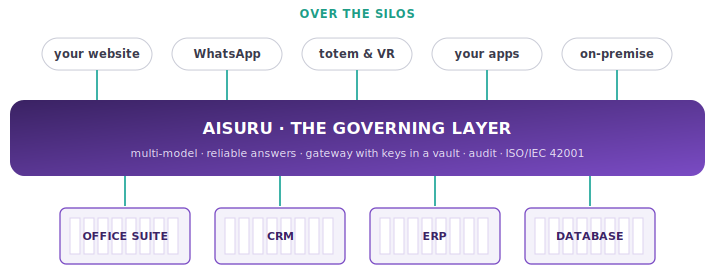
Copilot Studio builds agents inside the Microsoft ecosystem, for those who live there. AIsuru builds agents on top of any ecosystem: your models (open ones too, on-premise too), your systems (Microsoft included), your channels (website, WhatsApp, kiosks, apps), with ISO/IEC 42001-certified governance.
When to choose Copilot Studio
Let's say it plainly: if your goal is an internal assistant, for employees, inside Teams, that answers questions on SharePoint documents, and your company is entirely on Microsoft 365, Copilot Studio is an excellent starting point. Native integration, IT already trained, no additional procurement.
When the fence becomes a limit
Real projects, however, tend to outgrow the fence. Here are the boundaries you'll run into:
There's only one model.
Copilot Studio lives on the Azure OpenAI stack: you don't choose the model per task, you can't bring an open model onto your own hardware, and if something changes in that stack (pricing, rules, availability) you have no alternative. In AIsuru models are interchangeable: OpenAI, Anthropic, Mistral, on-premise open models, with your own keys, swappable without redoing anything. Anyone who remembers what happened in June with the frontier model suspended for European users knows why this point isn't theoretical.
On premise doesn't exist.
Copilot Studio is Microsoft cloud, period. AIsuru runs in the cloud, in a private cloud, or fully on-premise within your own perimeter, down to isolated environments: it's the entry condition for healthcare, finance, public administration, and anyone with data-residency constraints.
Customers stay out.
Copilot Studio is built for employees inside Teams. AIsuru agents also live on your website with your own brand experience, on WhatsApp, on physical kiosks, in VR, inside your own apps via API and web components. One agent, every channel.
Answers are always generated.
Copilot Studio grounds on documents, but the answer remains generative: hard to guarantee in an audit. AIsuru pairs generative answers with verified content: on the topics that matter, the agent answers with certain, human-approved answers, complete with author and date. It's the difference between "it usually answers well" and "on this, it answers exactly like this."
Costs are in credits.
Copilot Studio's credit/message-based model is notoriously hard to predict against real volumes. In AIsuru, consumption is visible per agent and per user at all times, with limits configurable by the administrator.
The comparison table
| AIsuru | Microsoft Copilot Studio | |
|---|---|---|
| Models | Multi-LLM with your own keys, open models, fine-tuning | Azure OpenAI stack |
| On-premise / air-gapped | Yes (also with Lenovo/WIIT partners) | No |
| Deterministic verified answers | Yes, content with human validation | No (generative with grounding) |
| Channels | Website, apps, WhatsApp, kiosks, VR, API | Teams, M365, websites (with constraints) |
| Integrations | 20+ MCPs, Enterprise MCPs with encrypted credentials in the gateway, universal connector for any API | Power Platform connectors (strong within Microsoft scope) |
| Multi-agent | Groups of Experts, agents communicating via MCP | Orchestration within Microsoft scope |
| Governance | Guardrails inherited by all agents, roles, audit, retention, consumption per agent and user | Governance administered via M365/Purview |
| AI certifications | ISO/IEC 42001 (AI management), plus ISO 27001, 27017, 27018, 9001, and NIS2 compliance | Microsoft cloud platform certifications |
| Jurisdiction | Italian, data in the EU, deployment within your own perimeter | United States (Microsoft) |
| Training included | Yes, AI Academy (covers the AI Act's training obligation, art. 4) | Documentation and online learning |
| Cost model | Transparent, with limits and consumption visible per agent/user | Credits/capacity, complex to estimate against volumes |
| Time-to-value | First agent in hours | Fast for internal M365 use cases |
The surprising point: you don't have to choose
AIsuru agents talk to Microsoft 365: through MCP connectors they read mail, calendar, SharePoint documents, with credentials kept encrypted in the gateway and never exposed to the models. Many of our customers keep Copilot for employees' personal productivity and use AIsuru as the layer for enterprise agents: the ones that talk to customers, cross multiple systems, need to pass an audit, or run on-premise.
The right question isn't "Copilot or AIsuru?" It's: who governs the agents that cross the fences?
Frequently asked questions
Is Copilot Studio free if I already have Microsoft 365?
No: it's paid in capacity/credits (roughly $200/month for 25,000 credits, plus user licenses), and consumption grows with real usage. The comparison should be made on the total project cost, including deployment and channel limits.
Can I use AIsuru if my company is entirely on Microsoft?
Yes: it's the most common scenario. AIsuru agents connect to Outlook, calendar, and documents via MCP, and add what's missing: multi-model, customer channels, on-premise, verified answers, AI certifications.
Which of the two is AI Act compliant?
Compliance concerns usage, not just the tool. AIsuru, however, was built to simplify it: it's ISO/IEC 42001 certified (the AI management standard aligned with the AI Act), it traces operations, provides for human oversight, and covers the training obligation with the Academy.
How long does it take to get started?
The first agent can be built in a few hours, with no code. Try it at aisuru.com, or write to us for a guided demo on your own case.
Want the comparison for your specific scenario? Talk to us and write to presales@memori.ai